AI Photo Editing:
What Works, What Fails, and What’s Next
Artificial intelligence has quietly become one of the most significant forces in modern photography. Open Lightroom today and AI is already suggesting your masks. Fire up Photoshop and a single click removes a stranger from your background. Scroll through any retouching forum and the conversation has shifted: not “should I use AI tools?” but “how do I use them well?”
But enthusiasm can outpace reality. For every task where AI delivers professional-grade results, there is another where it stumbles — sometimes spectacularly. Understanding the difference is not just useful. For working photographers and retouchers, it is essential.
In this post, we cut through the hype with an honest look at where AI photo editing genuinely earns its place, where it still lets you down, and what the next wave of tools is poised to change.
What AI Does Brilliantly
Some AI editing capabilities have matured to the point where the output is indistinguishable from expert manual work. These are the areas where the technology has genuinely earned its reputation.
Background Removal and Subject Masking
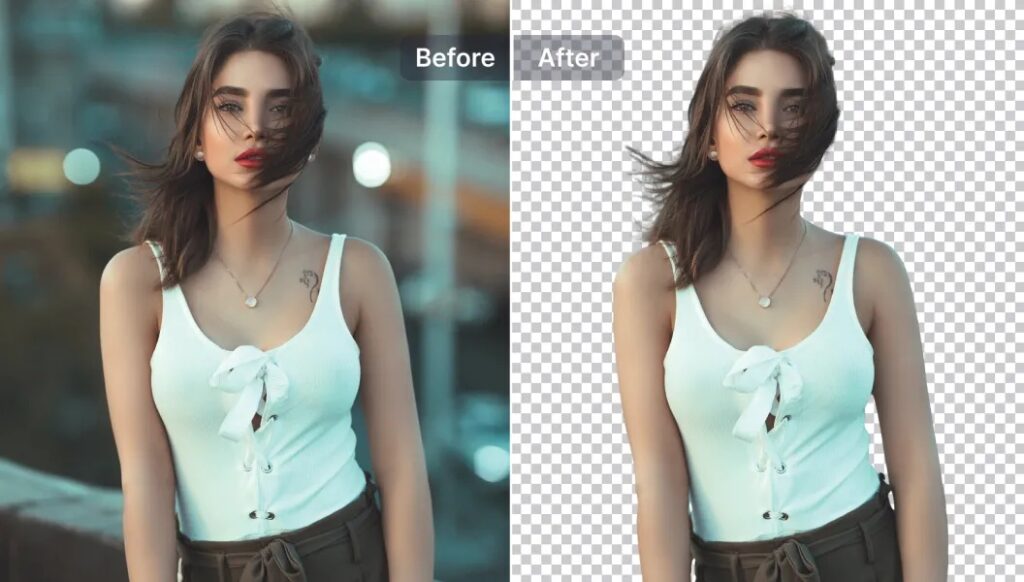
What once required twenty minutes with the pen tool now takes a single click. Tools like Adobe’s AI Select Subject, Remove bg, and Luminar Neo’s masking engine detect hair, translucent fabrics, and complex foliage edges with remarkable accuracy. The breakthrough is semantic understanding: the model knows the dog belongs in the foreground — not just that it has a different contrast edge from the grass.
For e-commerce teams processing thousands of product photos weekly, this capability alone has transformed production timelines. Mask quality that once took a skilled retoucher twenty minutes per image now arrives in under five seconds, accurate enough for most commercial use cases without further adjustment.
Noise Reduction and Upscaling
This is arguably AI’s single greatest contribution to photography. Traditional noise reduction blurred fine detail indiscriminately. AI denoisers — Topaz DeNoise AI, DxO PureRAW 4, Lightroom’s built-in Denoise — reconstruct plausible detail instead of suppressing it. ISO 12,800 files processed by these tools regularly clean up to the visual equivalent of ISO 3,200, with texture and micro-detail intact.
Complex Object Removal
Content-aware fill is impressive when the removed object sits against a plain or gently textured background. Remove a power line from an open sky and it works beautifully. Try to remove a person from a crowded marketplace, a window from a patterned brick wall, or a vehicle from a busy street, and the result frequently shows repeated textures, smeared detail, or poorly stitched seams. The AI must hallucinate content that belongs behind the removed object, and with complex backgrounds there simply is not enough surrounding context to make a convincing guess.
Intentional Stylisation and Creative Colour
AI enhancement tools default to what their training data defines as “normal.” When a photographer has made deliberate creative choices — a heavy film emulation, a stylised colour grade, an intentional tonal mood — many AI tools will push back against those decisions, pulling the image toward a generic average. The technology lacks creative intent. It can only see a deviation from the mean and attempt to correct it.
This is a particular caution with tools that apply global AI enhancements. Always work at reduced strength or apply AI adjustments selectively through masks to preserve the look you actually intended.
Fine Text and Graphic Detail
Upscaling and generative fill can struggle with text embedded in images, logo detail, fine geometric patterns, and sharp architectural linework. What appears sharp at thumbnail scale often reveals hallucinated or smeared content at 100%. Always inspect generated and upscaled work at full resolution before delivery.

The Hybrid Workflow: Getting the Best of Both
The professionals integrating AI most successfully have settled on the same approach: use AI for acceleration, humans for artistry. AI handles the heavy, repetitive, and technically definable tasks in the first pass. Human retouchers review, correct, and apply the creative judgment that no algorithm can replicate.
In practice, this means a three-stage process. In the first stage, AI handles noise reduction, lens correction, initial subject masking, and white balance normalisation — the technical foundations that consume time without requiring creative decisions. In the second stage, a trained eye reviews every
Upscaling follows the same logic. Rather than interpolating pixels, the model predicts what high-resolution detail should look like, based on training across millions of image pairs. Small, cropped, or archival images can now be enlarged to print-ready dimensions with results that genuinely hold up at full size.
Sky Replacement
Replacing a flat, overexposed sky used to require careful masking, perspective matching, and manual colour grading to make the new sky feel believable. AI sky replacement — in Luminar Neo and Photoshop’s built-in Sky Replacement filter — handles all of this automatically, detecting the horizon, fitting the replacement to the scene’s geometry, and adjusting ground lighting to maintain a coherent image. For architecture, real estate, and landscape photography, it is a reliable time-saver that produces results clients accept without question.
Portrait Enhancement at Scale
AI skin retouching has crossed a meaningful quality threshold. Rather than applying a uniform surface blur, the best tools — including Lightroom’s AI masking and Luminar Neo’s Skin AI — perform something close to frequency-separation retouching: smoothing texture while preserving the three-dimensional structure of the face. For portrait photographers delivering large batches, this represents an enormous reduction in post-processing hours without sacrificing output quality.

Where AI Still Fails
The failure modes of AI editing are as instructive as its successes. The core problem is this: AI does not understand your photograph. It recognises patterns within it. The moment a scene falls outside its training data, results degrade — sometimes dramatically.
Hands, Fingers, and Complex Anatomy
Ask any AI to generate or reconstruct a hand and you will quickly meet the limits of the technology. Too many knuckles, fused fingers, unnatural foreshortening — these failures are consistent across every major generative fill tool. Hands present extraordinary variation in pose and perspective, and encoding the spatial relationship between fingers in a two-dimensional feature map remains a genuinely difficult problem.
The practical implication: any generative task that requires synthesising human body parts — hands, feet, teeth — should be treated as a draft requiring manual correction. Never deliver AI-reconstructed anatomy without reviewing it carefully at full size.
AI output for artifacts, anatomical errors, and “improvements” that contradict the image’s intent. In the third stage, targeted retouching, colour grading, and final finishing are done by hand.
This division is not just practical — it reflects where skill is actually needed. The tasks AI handles well require no artistic judgment. The tasks requiring judgment are precisely where AI performs poorly. The two capabilities are almost perfectly complementary.
Choosing the Right Tool for the Task
- Noise reduction and upscaling: Topaz Photo AI, DxO PureRAW 4, Lightroom AI Denoise
- Subject masking and background removal: Adobe Firefly, Remove.bg, Luminar Neo
- Portrait skin retouching: Lightroom AI masking, Luminar Neo Skin AI
- Sky replacement: Luminar Neo Sky AI, Photoshop Sky Replacement
- Generative fill and object removal: Adobe Firefly Generative Fill
- Batch processing and culling: Imagen AI, Aftershoot

What’s Next: The Technologies to Watch
The next generation of AI editing tools will not simply do today’s tasks faster. Several emerging capabilities are likely to reshape retouching workflows within the next two to three years.
Natural Language Editing
Adobe Firefly is already moving toward text-prompt editing — describing an adjustment in plain language and having the model apply it to a specific area of the image. “Make the background feel like late-afternoon light” or “Soften the skin texture while keeping the eyes sharp” are becoming viable instructions, not just rough approximations. This will not replace technical expertise, but it will fundamentally change how that expertise is expressed.
AI Relighting
One of the most commercially significant near-term advances is AI that understands three-dimensional lighting and can relight a subject after the shot is taken — adjusting the direction, quality, and colour of light with physically plausible shadows and specular highlights. Early tools in this space already exist in research form. When they mature into production software, they will represent a fundamental change in what is fixable in post, particularly for product photography and commercial portraiture.
Style-Learning Models
Adobe’s Firefly Custom Models — currently in private beta — allow photographers to train a model on their own portfolio, creating a personalised AI layer that applies edits consistent with their signature aesthetic. Within a few years, personalised style models will be a standard feature across major editing platforms. Photographers who invest in curating their own training data now will have a meaningful competitive advantage as that capability matures.
Content Provenance and AI Transparency
As AI editing becomes invisible, the industry is standardising on embedded provenance metadata. The C2PA standard — backed by Adobe, Google, and Microsoft — creates a verifiable record of when and how AI was used in producing an image. For editorial, documentary, and commercial photography, transparent AI disclosure is becoming a client expectation, and in some contexts a contractual requirement. Retouchers who build AI-transparent workflows now will be ahead of that curve.
The Bottom Line
AI photo editing in 2026 is neither the magic wand that replaces skilled retouchers nor the overhyped gimmick that sceptics once dismissed it as. It is a genuine productivity multiplier for specific, well-defined tasks — and a liability when applied without critical oversight to complex, creative, or anatomically demanding work.
The formula that consistently works is simple: let AI handle the technical foundation, and reserve human skill for the decisions that require creative judgment, an understanding of the image’s intent, and the kind of critical eye that no training set can fully encode. Neither capability alone is sufficient. Together, they produce results that are faster, more consistent, and — when the collaboration is managed well — better than either could achieve independently.
At PhotoRetouchingUp.com, this is exactly how we work. Every project combines AI-assisted technical processing with experienced human retouching — because the best results come not from choosing between the two, but from knowing precisely when to use each.